Building an App - 101
A walkthrough using one small, real app.
There is a moment many people reach with an idea for an app. You can picture it clearly. You know who would use it and what it should do. Then a quieter thought shows up: I could never actually build that. So the idea goes back in the drawer. That thought is usually wrong, and it is worth pausing on why. Building a modern app is far less about inventing things from scratch and far more about assembling proven pieces and making a series of small, learnable decisions. The parts that used to stop people, like running servers, syncing data across devices, and handling logins, are now things you plug in rather than build. With an AI assistant beside you, the assembly goes faster still.
To keep this concrete, let us walk through one small, real app: a shared family calendar. A few people in one household, each with their own colour, all seeing the same events update live on phones and laptops. It is simple enough to hold in your head, and it touches every layer a real app needs.
Start with what people see
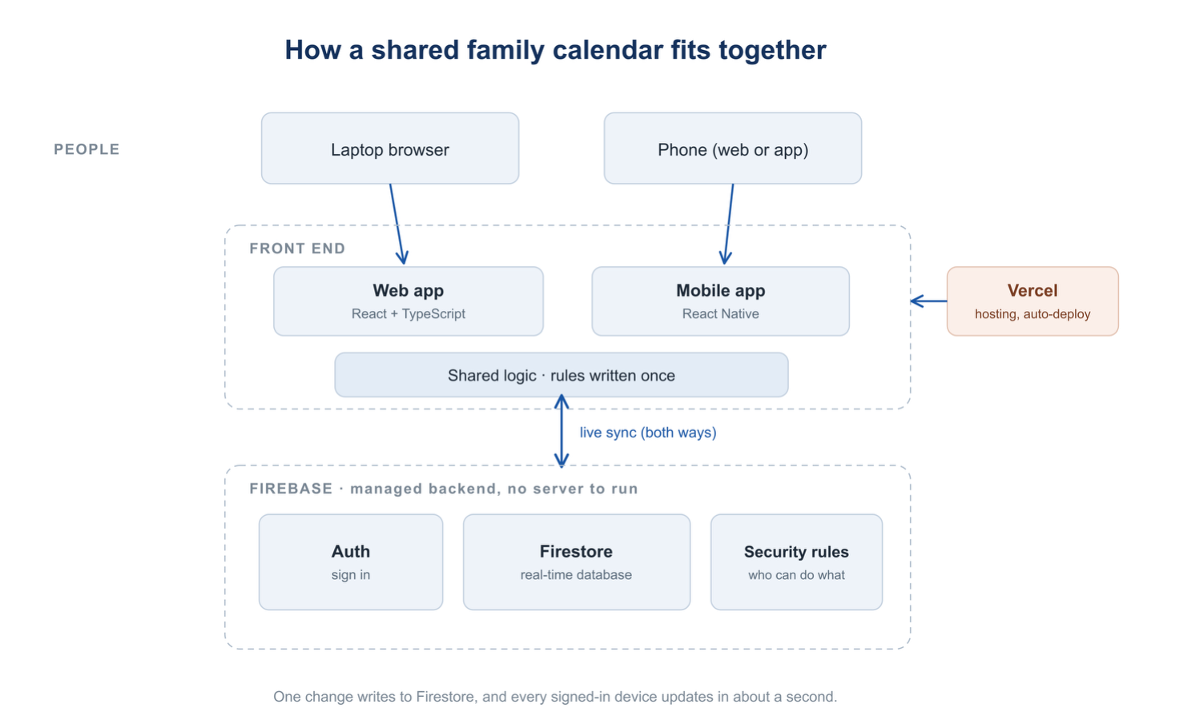
Every app has a front end. It is the part people touch: the screens, the buttons, the calendar grid itself. For the web, a common and friendly choice is React with TypeScript. React lets you build a screen out of small reusable blocks. TypeScript quietly catches mistakes as you type, which matters a lot when you are still learning. For phones, you can reuse most of your thinking with React Native, which produces real iOS and Android apps from similar code.
The useful trick is to keep the core logic, the actual rules of your app, in one shared place that both the web and the phone versions borrow from. You write the hard parts once. For the calendar, the front end is just the month grid, the event form, and a colour for each person. None of it is exotic. It is layout and a few rules.
The backend you do not have to build
Here is the part that surprises people. You do not have to build a server. A service like Firebase hands you the heavy machinery as ready-made parts:
• Sign in and accounts. Email and password, password resets, staying logged in. You configure it, you do not write it from scratch.
• A database that updates live. It stores your data and pushes changes out instantly. When one person adds an event, it appears on everyone else’s screen in a second or two, with no refresh.
• Rules for who can do what. A short set of security rules decides who can read and write. For the calendar, any family member can see and edit events, but no one can change someone else’s profile.
This is the quiet shift in how software gets built now. The work that once needed a backend team is mostly a setup step.
The magic is usually a built-in
The calendar’s best feature is that everything stays in sync. That feels like the hard part. It is not. The live updates come from a single built-in feature, a real-time listener. Your app says, tell me whenever the events change, and the database does exactly that. The thing that looks like magic is one of the easiest pieces to switch on. You will see this pattern again and again: the impressive-looking feature is often a tool someone already built for you.
Getting it to other people
An app on your laptop helps no one else. To share it, you deploy it, which simply means putting it online at a real link. For a web app, a service like Vercel connects to your code and publishes it automatically every time you make a change. You get a link you can send to anyone. They open it, sign up, and they are in. People can even add the link to their phone home screen so it feels like an installed app.
Build small, ship, then listen
The trap is trying to build everything before showing anyone. Do the opposite. Build in thin slices and get each one working end to end before moving to the next.
A sensible order for the calendar looked like this:
• First, only sign-up and login. Nothing else. Prove that a person can get in.
• Then one calendar view, with add, edit, and delete.
• Then the extras: other views, repeating events, holidays.
• Then live-sync polish, the phone app, reminders, and a dark mode.
• Then deploy it and hand it to real people.
That last step is where the real learning starts. The moment real users opened the calendar on their own phones, problems appeared that never showed up on a laptop. A storage feature broke in mobile browsers. The layout ran off the edge of the screen. None of it was visible until real people used it on real devices. You fix what they hit, you ship again, and the app gets better in days, not months.
This is the whole rhythm: build a slice, ship it, watch what breaks, fix it, repeat.
You can build this
You do not need to know everything before you start. You need a small idea, a willingness to assemble, and the patience to ship one slice at a time.
The pieces are sitting there waiting. A front end for the screen. A service for accounts and data. A built-in for live updates. A host to put it online. An AI assistant can help you wire them together and explain each step as you go.
The family calendar went from an idea to a working app that real people use, across web and phones, by making one small decision at a time. None of those decisions needed genius. They needed someone to start.
~Amrita Thavrani
P.S If you have come this far - thank you! Please consider subscribing at whatwasthatagain.com for posts where I break down AI concepts for PMs and beyond.
Member discussion